


Noxogy Sleep Tracker & Snore
4.5142.00 Reviews
App Specs
- Version
- 1.2.45
- Updated On
- License
- Free
- Downloads
- 500,000+
- Developer
- Apirox, s.r.o.
- Categories
- Medical
- Platform
- Android, iOS
Screenshots
 Analysis by AppCompare
Hey there, sleep enthusiasts! Ever wonder what happens when you close your eyes and drift off into dreamland? Well, wonder no more because I’ve got the lowdown on an app that’s about to become your new bedtime buddy. Let me introduce you to the Sleep Tracker & Sleep Recorder app. This nifty tool is designed to help you understand and improve your sleep quality, and trust me, it’s packed with features that make it worth a try.
What to Expect Before Bedtime
I’d treat this as a personal sleep journal with recording and tracking tools, not as a medical device or a substitute for professional advice. Its purpose is to help you notice what your nights sound like and how your routine changes over time. That distinction matters: a recording can give you a clue about snoring or noises, but it cannot diagnose why they happen.
The app is in the medical category, made by Apirox, s.r.o., and is free to install. It has a 4.7 average from around 4,600 ratings and has been installed over 100,000 times. It’s rated Teen, and optional in-app purchases range from $3.99 to $25.99 per item. Those details make it worth checking the purchase screen carefully before choosing anything paid, especially if you only want to try basic nighttime tracking.
First Impressions and Setup
Getting started with the Sleep Tracker & Sleep Recorder is as easy as pie. Simply download the app from your favorite app store, and you’re good to go. The interface is sleek and user-friendly, which is something I genuinely appreciate. Nobody wants to fumble around with complicated settings right before bed, am I right?
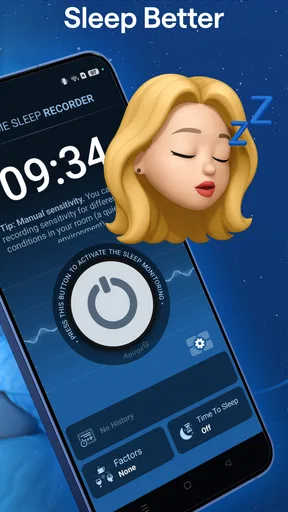
Once you’ve got the app installed, it walks you through a quick setup process. You can customize your sleep goals, input your usual bedtime, and even set gentle alarms to wake you up at the optimal time. The app smartly uses your phone’s sensors and microphone to track your sleep patterns. Don’t worry; it’s not going to record your midnight snack runs or sleep-talking confessions.
Making the First Night Useful
For a calmer first run, I’d set up the bedtime details before getting under the covers, then place the phone where it can stay undisturbed for the night. The practical goal is not to produce a perfect record on night one; it’s to create a baseline you can compare with later. If you change your bedtime, move the phone, or alter your usual routine, make a quick note so you don’t mistake a setup difference for a change in sleep.
Think of a realistic use case: you wake up tired after a night when someone in the house mentioned hearing snoring. Rather than guessing from memory, you can check what the recorder picked up and log how you feel that morning. If you see a similar pattern on several nights, that gives you a clearer conversation starter for a clinician than a single uncertain recollection. It still doesn’t establish a diagnosis, but it can help you describe what you noticed.
Worth Reading Before You Choose

Flipboard Shows What News Apps Must Do Beyond the Feed

Switching to Android Auto Means Rethinking Your Driving Routine

Google Calendar Makes a Crowded Week Easier to Manage

Ludo King Makes the Most of the Minutes Between Plans

Baby Panda World Brings Quick Play to Modern Phones, but Its Game Library Feels Busy

ESPN’s Live Game View Makes Following Close Games Easier
Because the microphone is part of the experience, I’d also make a deliberate choice about where the phone sits and who else might be nearby. A recording may capture sounds from a shared room, not just your own, so be considerate of anyone sleeping with you. If that feels uncomfortable, skip recording and use the parts of the app that suit your comfort level, if available in your setup. Don’t leave the phone somewhere it could be knocked off a table or tangled in bedding.
Features That Make It Stand Out
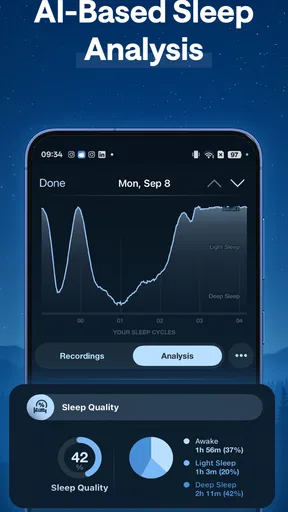
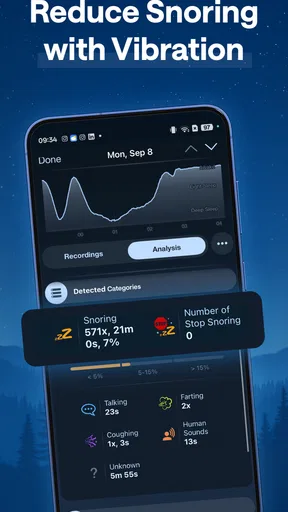
Now, let’s dive into what makes this app a standout choice for sleep tracking. First up, the app offers detailed sleep analysis. Each morning, you get a breakdown of your sleep stages, including light, deep, and REM sleep. It’s like having a personal sleep lab right in your pocket.
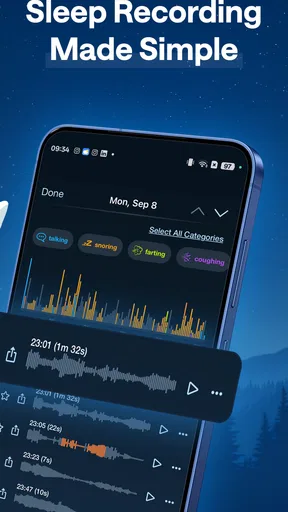
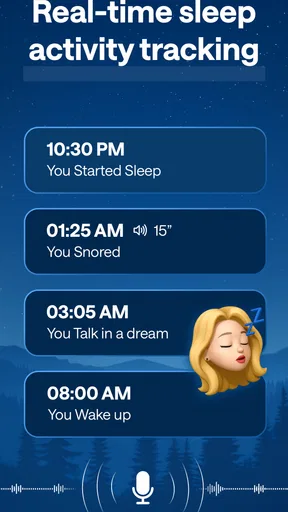
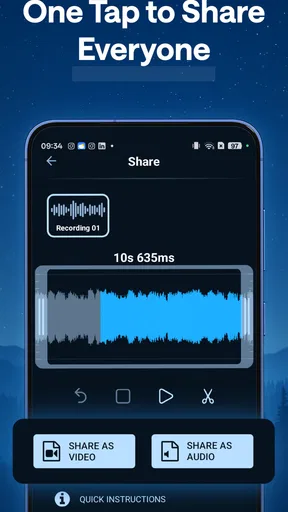
Another cool feature is the sleep recorder. This little gem records any noises you make during the night. You can play back your sleep sounds and even share them with friends if you’re feeling brave. It’s both fascinating and slightly terrifying to hear what goes on while you’re snoozing.
For those of us who love data, the app provides a comprehensive sleep diary. You can log how you feel each morning and track your sleep trends over time. This can be super helpful in identifying patterns and making necessary changes to your sleep habits.
Reading the Results Without Overreacting
The best way I’d use the analysis is to look for repeated patterns, not to treat a single score or sound as a verdict. A noisy night can have an ordinary explanation, and an apparently quiet recording doesn’t prove that sleep was restful. The useful question is whether the same kind of night tends to line up with how you feel the next day, or with a routine you can actually adjust.
One non-obvious habit that helps is to change only one bedtime variable at a time. If you move your bedtime earlier and also start a new wind-down routine on the same night, it’s difficult to tell which change mattered. Keep the morning diary brief and consistent: a simple note about how rested you feel is more useful for comparison than a detailed entry you’ll abandon after a few days.
Playback is most informative when you have a specific question, such as whether a recurring sound appears around the same part of the night. Listening through every recording can take time and may turn a curiosity into a nightly worry. I’d review only the clips or moments that seem relevant, then use the diary to keep the broader trend in view.
Quality of Sleep Insights
One of the standout features for me is the insightful sleep tips provided by the app. Based on your sleep data, it offers personalized advice to help you improve your sleep quality. Whether it’s suggesting a bedtime routine or recommending breathing exercises, these tips are a game-changer.
The app also includes relaxation sounds and guided meditations to help you wind down before bed. From calming rain to soothing ocean waves, there’s something for everyone. I’ve found these sounds to be incredibly helpful on those nights when my mind just won’t shut off.
How It Fits Among Sleep Tools
Compared with a wearable, a phone-based tracker is appealing if you don’t want to sleep wearing a watch or buy another device just to explore your habits. The trade-off is that a phone recording can be affected by where the phone is placed and by sounds in the room; it is not the same as a dedicated clinical measurement. If you already use a wearable and mainly want activity-linked trends, that may remain the more convenient option. If your main curiosity is nighttime sound and a simple diary, this app’s focus is more relevant.
It also differs from a plain alarm or a paper sleep log. An alarm can get you up, but it won’t help you revisit noises from the night; a paper log gives you control over what you record, but you have to create the habit and look for patterns yourself. This app brings those interests together, though anyone who wants only a reliable alarm or privacy with no audio recording may prefer a simpler alternative.
Personal Experience and Usability
So, how has the Sleep Tracker & Sleep Recorder app worked for me? Honestly, it’s been a revelation. I’ve learned so much about my sleep patterns and have made small changes that have had a big impact. The app is intuitive, and the daily insights keep me motivated to stick to my sleep goals.
I also love how the app doesn’t feel intrusive. It runs quietly in the background and doesn’t drain my phone’s battery like some other apps I’ve tried. Plus, the gentle wake-up alarms have made getting out of bed a much more pleasant experience.
Who Will Get the Most From It
I’d recommend it most to someone who is curious about snoring, sleep-talking, or other nighttime sounds and is willing to keep a short morning log. It can also suit a person who wants a nudge toward a steadier bedtime and enjoys reviewing trends rather than relying on memory. The payoff comes from using it consistently enough to compare nights, not from expecting a single recording to explain everything.
I’d skip it if you don’t want a phone near your bed, feel uneasy about microphone-based tracking, or need medically reliable measurements. It may also be the wrong fit if you find sleep scores make you anxious or encourage you to monitor every small variation. In those cases, a simple handwritten diary, a basic alarm, or advice from a healthcare professional is a better match than adding more nighttime data.
If the app seems to capture nothing, first check the simple things: whether the phone remained in place and whether the room was quiet enough for the sound you were hoping to notice. If the results vary, don’t assume the app has found a sudden health change; compare several nights under similar conditions. For concerning breathing symptoms or persistent daytime exhaustion, use the notes as context for a clinician rather than trying to settle the issue with an app.
Wrap-Up Thoughts
In conclusion, if you’re looking to take control of your sleep health, the Sleep Tracker & Sleep Recorder is definitely worth checking out. It’s packed with features that are both fun and functional, making it a valuable tool in your quest for better sleep.
Whether you’re struggling with insomnia or just curious about your sleep habits, this app offers everything you need to get a deeper understanding of your nightly rest. Give it a try and see how it transforms your sleep routine.
Before installing, it’s useful to know that the current version is 1.2.35 and it requires Android 6.0 or later. I’d start by trying the free experience and deciding whether the recording and diary fit your routine before considering any optional purchase. If you’re on iOS, check the app’s requirements in the relevant store before downloading, since the version and minimum OS details here apply to Android.
My practical next step would be simple: choose a regular bedtime, let the app collect a few ordinary nights, and make brief morning notes before drawing conclusions. If you discover a repeated sound or a routine that seems connected to how rested you feel, use that observation to decide what to change or discuss. That measured approach is where this app is most useful—and it keeps an interesting recording from being mistaken for a medical answer.
Sweet dreams!
Pros
- Easy to navigate interface.
- Comprehensive sleep analytics.
- Customizable sleep goals.
- Integrates with health apps.
- Gentle wake-up alarm feature.
Cons
- Free version has ads.
- Limited features without premium.
- Battery consumption can be high.
- Data export options are limited.
- No integration with wearable devices.
FAQs for Noxogy Sleep Tracker & Snore
What features does Sleep Tracker & Sleep Recorder offer?
Sleep Tracker & Sleep Recorder provides a comprehensive suite of tools designed to monitor and improve your sleep quality. It includes features like sleep cycle tracking, a smart alarm, a detailed sleep analysis, and ambient sound recording. These tools work together to help you understand your sleep patterns and make informed adjustments to enhance restfulness.
Is Sleep Tracker & Sleep Recorder easy to use for beginners?
Yes, Sleep Tracker & Sleep Recorder is designed with user-friendliness in mind. The intuitive interface allows users of all experience levels to easily navigate the app. With simple setup instructions and clear on-screen prompts, beginners can start tracking their sleep patterns without any hassle.
How accurate is the sleep tracking data in Sleep Tracker & Sleep Recorder?
The app uses advanced algorithms to provide highly accurate sleep tracking. By utilizing your phone’s sensors, it detects movements and sounds to analyze sleep cycles. While no app can replace professional medical equipment, Sleep Tracker & Sleep Recorder offers reliable insights for personal health monitoring.
Does Sleep Tracker & Sleep Recorder require any additional devices?
No additional devices are required to use Sleep Tracker & Sleep Recorder. The app uses your smartphone's built-in sensors to track sleep data. However, it’s recommended to place your phone near your bed for optimal performance. Optional integrations with wearable devices may enhance data accuracy.
Are there any privacy concerns with using Sleep Tracker & Sleep Recorder?
Sleep Tracker & Sleep Recorder takes privacy seriously. The app only collects data necessary for sleep analysis and offers options to store data locally on your device. Users can review and delete stored data at any time. Always review the app’s privacy policy to understand how your data is managed.


